
Creating your own electronics is a ton of fun. But it can be boring when they don’t do anything on their own.
This is where the 555 timer chip comes in. A 555 chip allows us to create oscillations and timed effects on our electronics. So in today’s MakerHub tutorial, we will be making a police light switch on a breadboard on Tinkercad.
What is Tinkercad?
Tinkercad is a free-of-charge, online 3D modeling and circuitry program that runs in a web browser. We will use Tinkercad to create our police lights circuit.
What is a 555 timer?
The 555 Timer can be found in many electronic devices, from toys and kitchen appliances to even spacecraft. It is a highly stable integrated circuit that can produce accurate time delays and oscillations. We will use this chip to give our circuit a little more life.
Don’t let all of the technical lines confuse you. All you have to worry about is the 8 terminals.
Step 1. Gathering components
To complete this project, we will need the following parts:
- (1) Breadboard
- (1) 9-volt battery
- (2) LED lights
- (3) Resister
- (1) Capacitor
- (1) Potentiometer
- (1) 555 Timer chip
You may also refer to the infographic below to learn a little more about these parts and how they function.
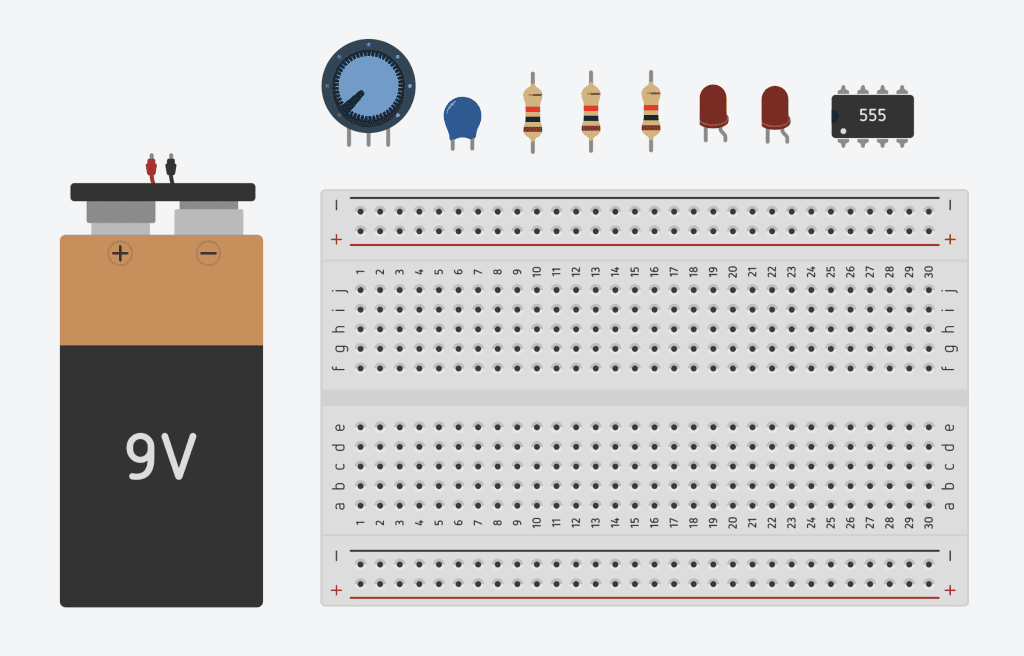
I always like to start a project by grabbing all the parts I need and dropping them on the breadboard, so I don’t have to go back and forth searching for items in the components list. Below is an image of the parts you will need to complete this project.
1. Breadboard
We will start, as usual, with a breadboard. Search for a breadboard and drop it into your work area.
2. Power source
The second thing we will need is a power source. Let’s use a 9-volt battery for this project. Grab a nine-volt battery and drag it right onto your work area.
3. LEDs
Next, we need some LEDs. Search for LED and select the red one with two terminals. Drag two of those onto the breadboard. But we can’t make police lights with just two red lights. Click on the LED to change the color. Select one of the LEDs and choose blue.
4. Resistors
If you recall our last video, you know you can’t just use LEDs with a power source. You’ll blow out the lights. You need a way to limit the current that flows through the LED. This is where resistors come in. Grab resistors from the components panel and drop it right next to your LEDs.
5. Capacitor
We will need a capacitor. Grab the blue capacitor and place it near the 555 chip. If you don’t know what a capacitor is, don’t worry. You don’t need to know what a capacitor is or how it works just yet. We will cover that in another lesson.
6. Potentiometer
We will use a type of switch called a potentiometer to increase or reduce the resistance on our circuit and, as a result, change the speed of our LED lights. Search for a potentiometer and put it anywhere in the work area. We won’t need it until later.
7. 555 timer
Finally, drag a 555 timer to your board. Anywhere will do.
By this point, your work area should look something like the image above.
Wiring it all together
Now that we got our parts in order. It’s time to wire it all together.
Step 1. Power the rails.
This is a good time to connect your top and bottom rails. Just drag a wire from the positive terminal on both rails together. Undo the same for the negative rail.
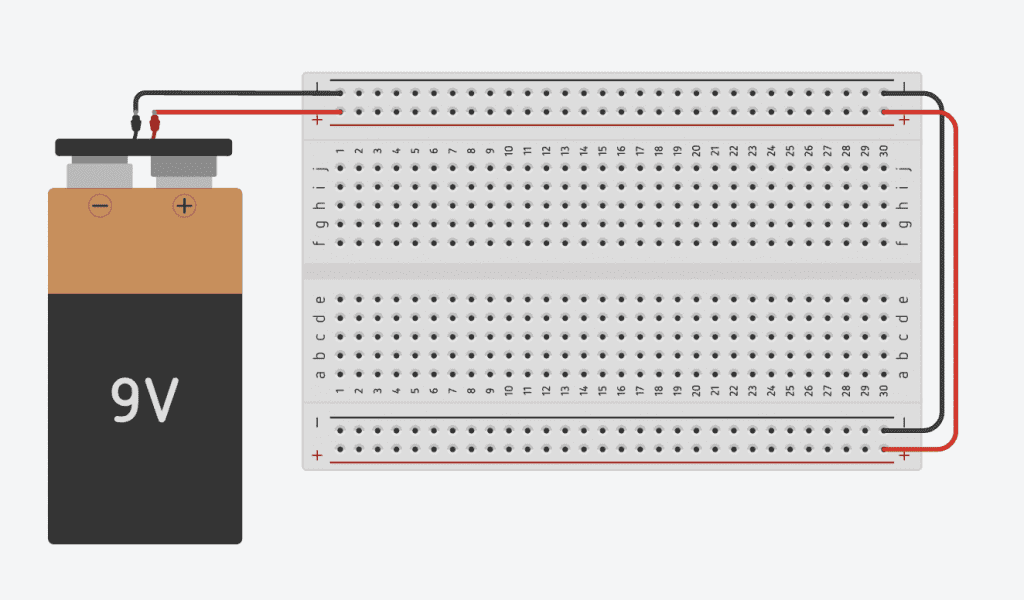
Tip: When wiring components, you can click anywhere to create a bend or elbow to make your design.
Tip: Consider naming your components when you drop them on the breadboard. That can come in handy when you have many of the same components.
Step 2. Wire your LEDs
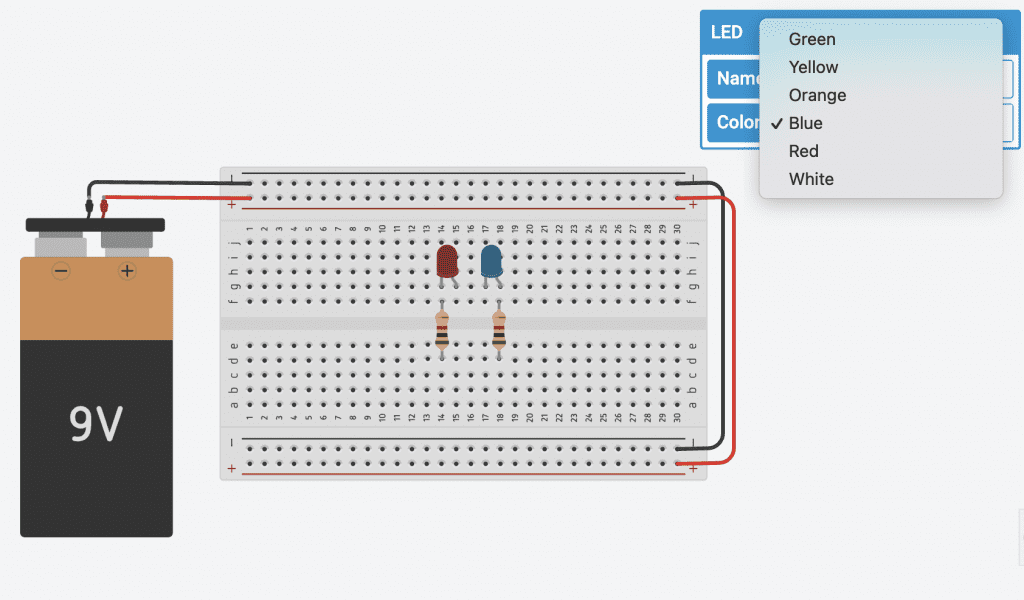
Take your resistors and connect them to our LED. This will be wired a little differently than a conventional LED. We will wire the second LED backward, so one of your resistors will go to the straight leg of the right transistor (cathode) and another resistor to the long leg (anode) of the blue LED. And, let’s set both our LEDs to 500 ohms.
We also need to change the color of one of our LEDs. To do this, click on the LED, select color, and select blue. It’s that easy.
Your breadboard should now look like this.
Step 3: Wire your 555 timer
Place your 555 timer on the breadboard near your LED.
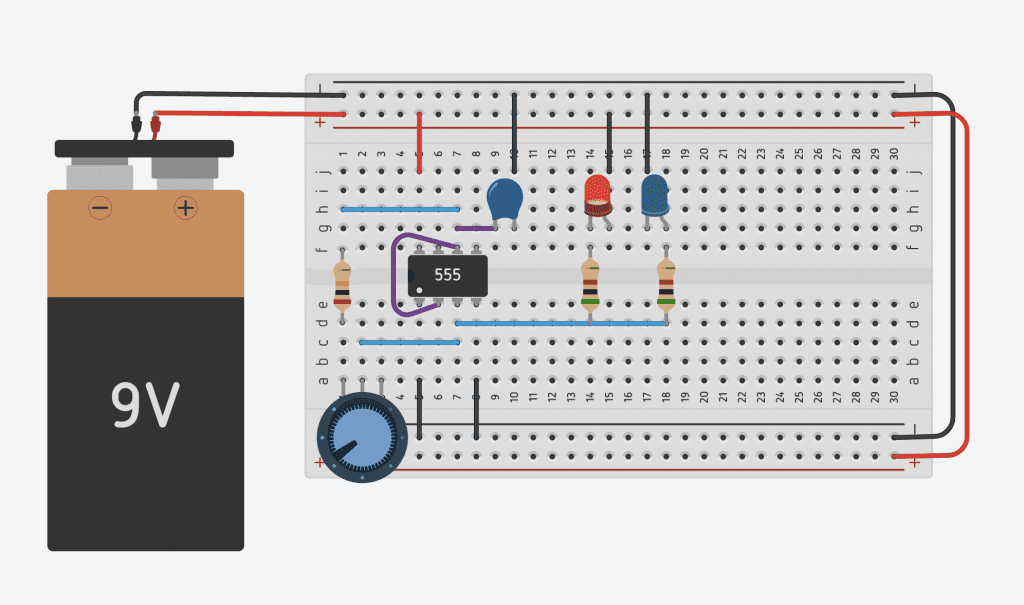
Provide some power for your 555 timer by connecting the top left terminal (power) to the powered rail. And the bottom left leg (ground) and reset terminal (reset) to the ground rail.
Next, connect the output terminal to the resistor touching the cathode of the red LED. And make a connection on the same note to the resistor connected to the anode of the blue LED.
Finally, connect the trigger and threshold terminals to each other.
Tip: Make sure to color your wires to make the power output easier to trace.
Step 4: Install the capacitor
Place the capacitor near your 555 chip and connect your threshold to the capacitor.
The threshold note is getting a little cramped, but we need to add one more thing to the note, another resistor. Connect a resistor to your threshold, then connect that resistor to your output terminal.
Wow, that was a lot of connecting. Let’s take a moment to step back and look at what we’ve got going on. Let’s run our circuit and take a look at what happens. You will notice that both of the lights are on at once. That’s not exactly what we want. We want these lights to blink, so let’s tinker with the capacitor and resistor values.
- Adjust the capacitor value to 1 uf.
- Adjust resistor-an increase from 10 kΩ.
Step 5: Make it interactive by adding a potentiometer.
The simulation is blinking properly, but how can we control this further? We can use a potentiometer. The potentiometer will allow us to adjust the resistance with the turn of a knob, so we don’t need to swap out resistors to change the blinking speed. This is going to make the circuit interactive and a lot more fun.
Place a potentiometer on your breadboard. And connect the leftmost lead to the resistor connected to the capacitor and the middle leg to the output.
Tip: As it’s essentially a resistor, polarity does not matter with a potentiometer.
Your circuit should now look like this.
Below is a different wiring of the same circuit. in case the one makes more sense to you.
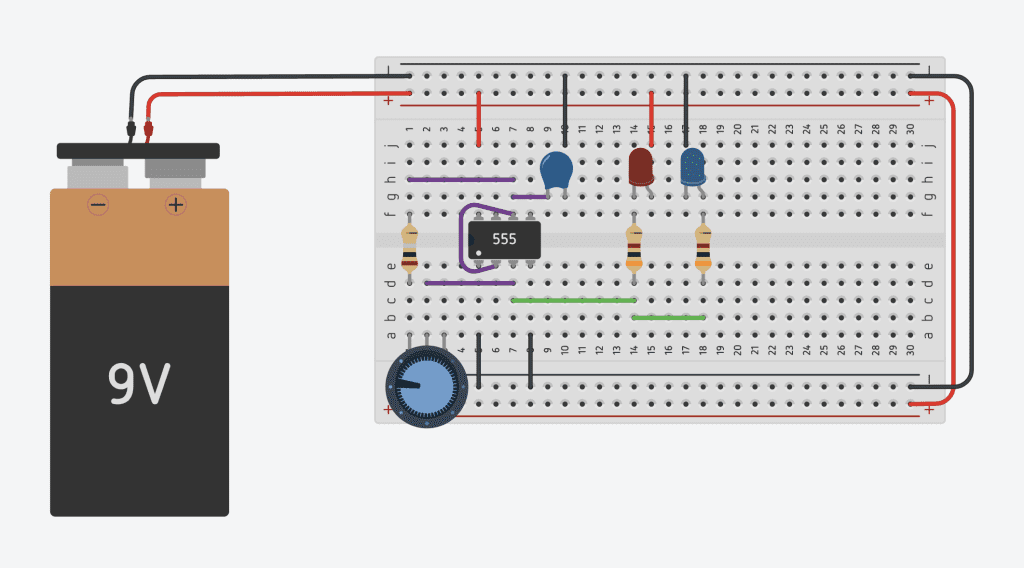
Now, if we play with the potentiometer, the light will change blinking speeds while the simulation is running. Ain’t that cool?
Conclusion
Using TinkerCad circuit is a great way to learn how electronic circuits work. It’s free and really easy to use. And now, you’re ready to start exploring all the software offers.
This concludes our tutorial on lighting up an LED in Tinkercad circuits. To learn more, check out our full interactive electronics module here.